
ProForm Elliptical User Manual: A Comprehensive Guide
Welcome! This manual details the ProForm elliptical trainer, model 831.23935.0, offering effective home workouts. Dimensions are 5’8” length and 2’2” width.
Congratulations on choosing a ProForm elliptical trainer! This machine is designed to provide a comprehensive and effective cardiovascular workout in the comfort of your home. The ProForm elliptical offers an impressive selection of features intended to enhance your fitness journey and help you achieve your health goals.
Before you begin, please take the time to carefully read this user manual. It contains important information regarding the safe operation, assembly, maintenance, and troubleshooting of your new elliptical. Understanding these guidelines will ensure a safe and enjoyable workout experience. This manual specifically addresses model 831.23935.0, and provides details on its various components and functionalities.
We are confident that your ProForm elliptical will become a valuable asset in your pursuit of a healthier lifestyle. Let’s get started!
Unboxing and Assembly
Carefully unpack all components from the shipping carton. Verify that all parts listed in the ‘Parts List and Identification’ section are present. It’s recommended to assemble the elliptical on a protective surface, like a large piece of cardboard, to prevent scratching the floor or damaging the machine.
Begin by attaching the base components, following the step-by-step instructions included with your model. Use the provided hardware, referencing the drawings to correctly identify each part – the numbers in parentheses correspond to the part list. Ensure all bolts are securely tightened, but avoid over-tightening.
Next, assemble the upright and console components. Finally, attach the pedals and any remaining accessories. Double-check all connections for stability before using the elliptical. If you encounter any difficulties, refer to the detailed diagrams or contact customer support.
Parts List and Identification
Locate the comprehensive parts list included within your ProForm elliptical packaging. This list details every component necessary for assembly and future maintenance. Each part is assigned a unique key number, crucial for referencing during the assembly process and when ordering replacement parts.
Carefully compare the physical parts with the illustrations and descriptions provided in the list. Pay close attention to the shape, size, and any specific markings on each component. The manual utilizes drawings to visually identify smaller parts, making assembly easier.
Familiarize yourself with the names and functions of key components like the base frame, upright assembly, console, pedals, and resistance mechanism. Knowing these parts will aid in troubleshooting and performing routine maintenance. Keep this parts list in a safe place for future reference.
Safety Precautions and Warnings
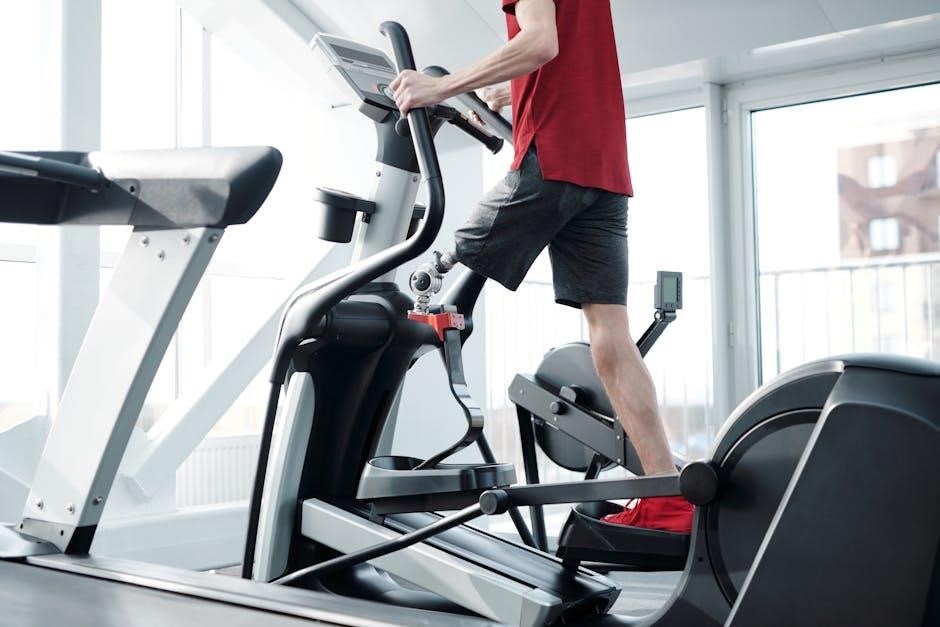
Prioritize safety during assembly, operation, and maintenance of your ProForm elliptical. Always read all precautions and instructions thoroughly before use. Ensure the elliptical is placed on a level surface with at least eight feet of clearance around it.
Inspect all parts for damage before each workout. Do not use the elliptical if any parts are missing or damaged. Keep children and pets away from the machine during operation. Never operate the elliptical with wet hands or feet.
Always wear appropriate athletic shoes and clothing. Use caution when getting on or off the elliptical. If you feel pain or dizziness, immediately stop exercising. Consult your physician before starting any new exercise program.

Getting Started with Your Elliptical
Begin your fitness journey! Familiarize yourself with the console features, power-on procedures, and resistance adjustments for an optimal elliptical experience.
Console Overview and Features
The console is your command center! It displays essential workout data, including time, distance, speed, resistance level, and calories burned. Explore the intuitive interface for easy navigation through pre-programmed workouts and custom settings.

Key features include clearly visible display metrics, heart rate monitoring compatibility (if equipped), and user profile selection. The console allows for seamless adjustment of resistance levels, enabling you to tailor the intensity of your workouts.
Furthermore, the console may offer connectivity options like Bluetooth, facilitating integration with fitness apps and iFit (sold separately). Utilize the console’s buttons to start, stop, and pause your workouts, as well as to access various program options. Understanding these features will maximize your elliptical training experience and help you achieve your fitness goals efficiently.
Powering On and Initial Setup
Let’s get started! Before your first workout, ensure the elliptical is fully assembled and properly positioned. Plug the power cord into a grounded outlet. The console will illuminate upon power-up, initiating a self-test sequence.
Follow the on-screen prompts to complete the initial setup. This typically involves entering your personal information, such as age, weight, and height, to personalize workout calculations. You may also be prompted to select your preferred units of measurement (miles or kilometers).
Familiarize yourself with the emergency stop button – a crucial safety feature. Confirm the console displays accurate information and responds to button presses. If prompted, calibrate the console according to the instructions. A successful initial setup ensures accurate data tracking and a smooth workout experience.
Adjusting Resistance Levels
Control your intensity! The ProForm elliptical allows you to easily adjust resistance levels for a customized workout. Resistance is typically controlled via buttons on the console, often marked with “+” and “-” symbols. Pressing “+” increases the resistance, making your workout more challenging, while “-” decreases it.
The console display will indicate the current resistance level, usually ranging from 1 to 20 or higher, depending on the model. Start with a lower resistance level and gradually increase it as your fitness improves. Experiment with different levels to find what suits your fitness goals.
Some models feature pre-programmed workouts that automatically adjust resistance throughout the session. Remember to adjust gradually and listen to your body to avoid overexertion.
Stride Length Adjustment
Personalize your motion! Optimizing stride length is crucial for comfort and effectiveness on your ProForm elliptical. Many models offer adjustable stride lengths, accommodating users of varying heights and preferences. Locate the adjustment mechanism, typically near the pedals or foot platforms.
This often involves a simple pin or lever system. Releasing the pin allows you to reposition the pedals, altering the length of your stride. A longer stride is generally preferred by taller users, while a shorter stride suits those with shorter legs. Experiment to find a natural, comfortable stride.
Ensure both pedals are adjusted to the same length for balanced motion. Proper stride length minimizes strain and maximizes workout efficiency. Consult your specific model’s diagrams for precise adjustment instructions.

Workout Programs and Customization
Explore fitness options! This section details pre-programmed workouts and how to create personalized routines, maximizing your ProForm elliptical’s potential for varied training.
Pre-programmed Workout Profiles
Diverse Training Options: Your ProForm elliptical boasts a selection of pre-programmed workout profiles designed to cater to various fitness levels and goals. These profiles automatically adjust resistance and incline, providing a dynamic and challenging workout experience without requiring manual intervention.
Workout Variety: Expect profiles focused on different areas, such as fat burning, cardio, hill climbs, and interval training. Each profile simulates a different workout scenario, keeping your routines engaging and preventing plateaus. The console display will clearly indicate the current profile, the remaining time, and the intensity level.
Easy Selection: Navigating these profiles is straightforward via the console. Simply browse the available options and select the one that best suits your desired workout. The elliptical will then guide you through the program, automatically adjusting the settings as needed. Experiment with different profiles to discover what works best for you and to continually challenge your body.
Creating Custom Workouts
Personalized Fitness: Beyond pre-programmed options, your ProForm elliptical empowers you to design custom workouts tailored to your specific fitness aspirations. This feature allows for complete control over workout intensity, duration, and resistance levels, maximizing your training effectiveness.
Manual Control: Utilize the console to manually adjust resistance and incline throughout your workout. Increase the challenge during peak intervals and reduce it for recovery periods. You can also set specific time durations for each intensity level, creating a truly personalized routine.

Save Your Progress: Many ProForm models allow you to save your custom workouts for future use. This eliminates the need to recreate your preferred routines each time, streamlining your fitness journey. Explore the console’s menu options to discover how to save, load, and modify your custom profiles.
Heart Rate Monitoring
Track Your Intensity: Accurate heart rate monitoring is crucial for optimizing your workouts. Your ProForm elliptical offers several methods for tracking your pulse, enabling you to stay within your target heart rate zone for maximum calorie burn and cardiovascular improvement.
Grip Pulse Sensors: Conveniently located on the handlebars, the grip pulse sensors provide a quick and easy way to monitor your heart rate during exercise. Simply hold the sensors firmly to receive a reading on the console display. Ensure a consistent grip for accurate results.
Wireless Heart Rate Monitoring: For hands-free monitoring, your elliptical is compatible with select wireless heart rate chest straps (sold separately). This provides continuous and precise heart rate data without interrupting your workout flow. Consult your console’s manual for compatible strap models.
Using the Console Display

Navigating Your Data: The console display is your central hub for workout information. It presents real-time data such as time, distance, speed, incline, resistance level, and estimated calories burned. Familiarize yourself with the button layout to easily navigate between metrics.
Workout Profiles & Metrics: During a workout, the display clearly shows your progress within the selected program. Key performance indicators are prominently displayed, allowing you to monitor your intensity and adjust accordingly. The display also provides feedback on your heart rate, if a sensor is in use.
Customization Options: Many ProForm consoles allow you to customize the display settings, such as brightness and metric units. Explore the console menu to personalize your viewing experience. Refer to the console’s specific manual for detailed instructions on display customization.
Maintenance and Troubleshooting
Keep it Running Smoothly: Regular cleaning, lubrication, and belt tension checks are vital for optimal performance and longevity of your ProForm elliptical trainer.
Cleaning and Lubrication
Maintaining a Pristine Machine: To ensure the longevity and smooth operation of your ProForm elliptical, regular cleaning is essential. Wipe down the frame, console, and handrails with a damp cloth after each use to remove sweat and dust. Avoid abrasive cleaners, as they can damage the surfaces.
Lubrication is Key: Proper lubrication minimizes friction and wear on moving parts. Periodically lubricate the elliptical’s drive system, specifically where the drive link connects to the front crank arm. Use a silicone-based lubricant specifically designed for exercise equipment – do not use oil-based lubricants. Apply sparingly, following the manufacturer’s instructions. Over-lubrication can attract dust and grime.
Belt Care: Inspect the running belt regularly for wear and tear. Clean the belt with a soft, damp cloth. Avoid getting water on the console or other electronic components. Consistent cleaning and lubrication will contribute to a quieter, smoother, and more enjoyable workout experience.
Belt Tension Adjustment
Maintaining Optimal Performance: Correct belt tension is crucial for a smooth and effective elliptical workout. If the belt slips during use, or feels loose, it requires adjustment. Locate the rear adjustment knob, typically found at the back of the elliptical frame.
Adjusting the Tension: Turning the knob clockwise increases tension, while turning it counterclockwise decreases tension. Make small adjustments – a quarter turn at a time – and test the belt after each adjustment. The belt should feel firm but not overly tight. Avoid excessive tension, as this can strain the motor and other components.
Proper Feel: A properly tensioned belt will provide a stable and consistent feel underfoot. If you continue to experience slippage or excessive looseness after adjustments, consult a qualified technician. Regular checks and adjustments will ensure optimal performance and prevent premature wear.
Troubleshooting Common Issues
Addressing Typical Problems: Several issues can arise during elliptical use. If the console doesn’t power on, check the power cord and outlet. Ensure the cord is securely connected at both ends. For unusual noises, inspect for loose parts and tighten any bolts you find. A slipping belt often indicates insufficient tension – refer to the ‘Belt Tension Adjustment’ section.
Console Errors: If the console displays an error code, consult the ‘Error Codes and Solutions’ section for specific guidance. Intermittent operation might suggest a loose connection within the console itself. Always power off and unplug the elliptical before inspecting internal components.
Preventative Measures: Regular cleaning and lubrication, as outlined in the ‘Maintenance’ section, can prevent many common problems. If issues persist, contact ProForm customer support for assistance. Do not attempt repairs beyond your skill level.
Error Codes and Solutions
Decoding Console Messages: The ProForm elliptical console utilizes error codes to diagnose internal issues. While specific codes vary by model, common errors include “ERR 1” indicating a communication fault, often resolved by restarting the console. “ERR 2” may signal a motor overload; reduce resistance and try again.
Troubleshooting Steps: If an error persists, power off the elliptical for several minutes, then restart. Check all cable connections to the console. If the error continues, record the code and contact ProForm customer support, providing your elliptical’s serial number for efficient assistance.
Preventative Maintenance: Regular maintenance, including cleaning and lubrication, can minimize error occurrences. Avoid exceeding the maximum user weight capacity, as this can trigger motor-related errors. Always consult the full user manual for a comprehensive list of error codes and their solutions.

Advanced Features and Connectivity
Explore iFit! This elliptical offers Bluetooth connectivity and iFit compatibility for enhanced workouts and data tracking, personalizing your fitness journey.
iFit Compatibility and Setup
Unlock Interactive Fitness! Your ProForm elliptical is designed to seamlessly integrate with iFit, a leading interactive fitness platform. iFit provides access to a vast library of on-demand workouts, studio classes, and global workout destinations, all led by certified trainers.
Getting Started: To begin, download the iFit app on your smartphone or tablet. Create an account or log in if you already have one. Follow the in-app instructions to connect your elliptical via Bluetooth. The console will guide you through the pairing process.
Subscription Required: Please note that an iFit subscription is required to access the full range of features. You can choose from individual or family plans. Once connected, you can explore the iFit library directly on the elliptical’s console, enjoying personalized training experiences tailored to your fitness level and goals. Regular updates enhance the iFit experience.
Bluetooth Connectivity
Stay Connected and Track Your Progress! Your ProForm elliptical features Bluetooth connectivity, enabling seamless integration with various fitness apps and devices. This allows you to monitor your workout data, track your progress, and share your achievements with friends.
Pairing Devices: To connect your smartphone or tablet, navigate to the Bluetooth settings on your device and search for available devices. Select your ProForm elliptical from the list. You may be prompted to enter a pairing code, displayed on the console. Once paired, you can stream music, utilize fitness apps, and sync workout data.
Data Synchronization: Bluetooth connectivity facilitates automatic synchronization of workout metrics like time, distance, calories burned, and heart rate to compatible fitness platforms. Ensure Bluetooth is enabled on both your elliptical and your device for optimal performance. Consistent connectivity enhances your overall fitness tracking experience.
User Profiles and Data Tracking
Personalized Fitness Experience! The ProForm elliptical allows for the creation of multiple user profiles, catering to individual fitness goals and preferences. Each profile stores personalized data, including age, weight, and workout history, ensuring accurate calorie burn and distance calculations.
Tracking Your Progress: The console diligently tracks key workout metrics such as time, distance, speed, incline, resistance level, and calories burned. This data is stored within each user profile, providing a comprehensive overview of your fitness journey. Review past workouts to identify trends and monitor improvements.
Data Analysis & Motivation: Regularly reviewing your tracked data can be incredibly motivating. Identify peak performance times, areas for improvement, and celebrate milestones achieved. Utilizing user profiles and data tracking features maximizes the effectiveness of your ProForm elliptical workouts.
Elliptical Dimensions and Specifications
Understanding Your Machine’s Size: The ProForm elliptical trainer, specifically model 831.23935.0, is designed with space efficiency in mind while providing a robust workout platform. Its overall length measures 5 feet 8 inches (173 cm), and the width extends to 2 feet 2 inches (66 cm).
Weight Capacity & Stability: This elliptical boasts a sturdy construction capable of supporting a maximum user weight. While the exact weight capacity varies by model, it’s designed for stability during intense workouts; Always refer to the specific model’s documentation for precise weight limits.
Footprint Considerations: When planning your workout space, consider these dimensions to ensure adequate room for comfortable and safe operation. Proper spacing allows for a full range of motion and prevents accidental contact with surrounding objects.